How-to guides
Read a meeting digest
Understand the digest — the summary, decisions, to-dos, and first drafts Launch OS produces from a meeting.
The digest is what Launch OS produces from a processed meeting. It's where you see what was discussed and pick up the work that came out of it.
Open a digest
In Meetings, click a meeting, then View digest. (You can also reach a digest from the Calendar or from Home.)
What's on the digest
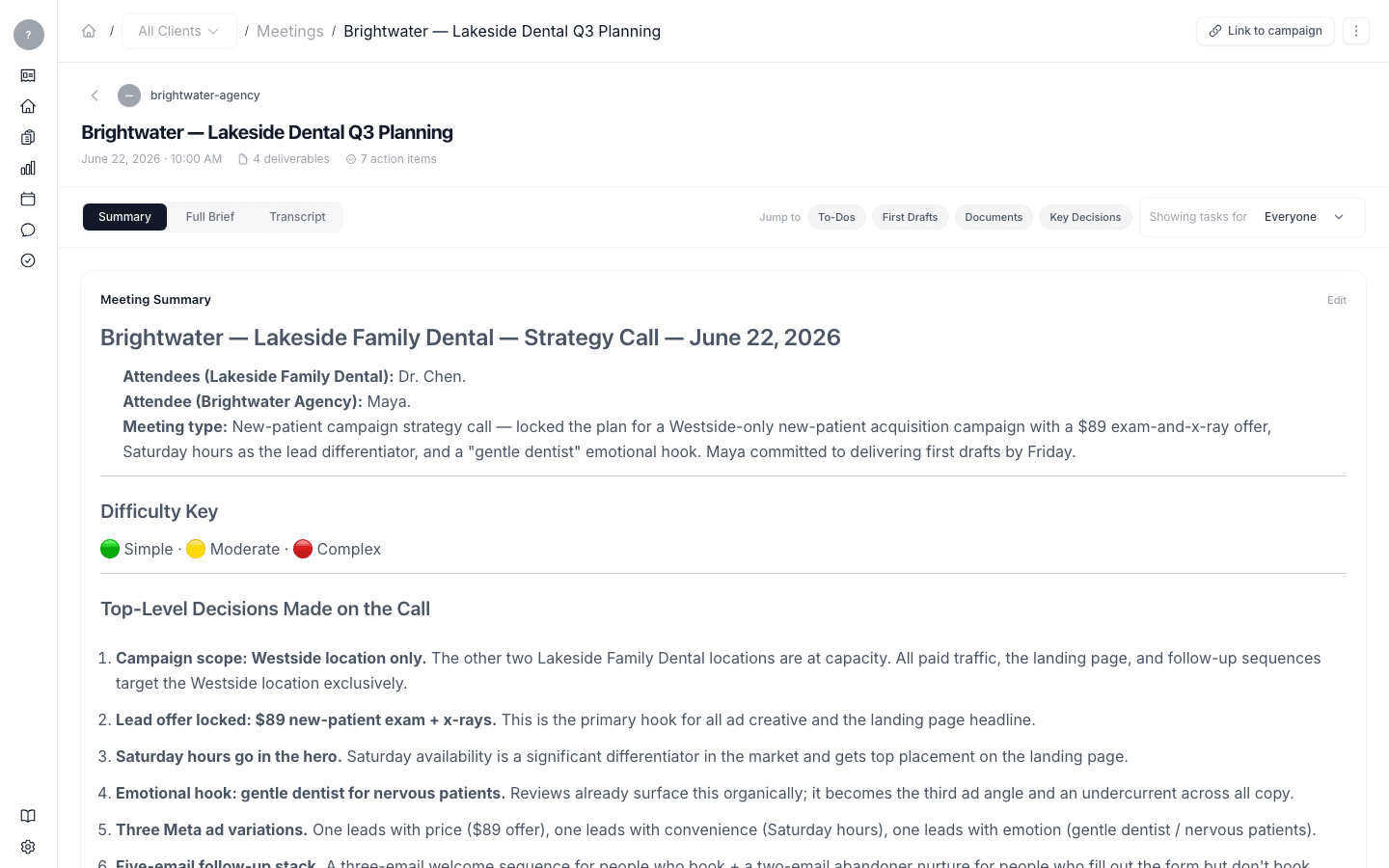
The header shows the meeting's client, title, date, and participants, plus a count of deliverables and action items, and a Link to campaign option.
Below that are three tabs:
- Summary (the default) — a plain-English summary of the meeting, the Key Decisions, and then three lists:
- To-Dos — the action items, each with an owner, status, and due date. Next to each to-do, a "→" link opens the first draft written for it.
- First Drafts — the deliverables Launch OS drafted, with their type and status.
- Documents — finished documents and artifacts from the meeting.
- Full Brief — the longer write-up of the meeting.
- Transcript — the full transcript.
Use Showing tasks for to filter the to-dos by person, and switch between Flat list and Group by person.
What's next
From a to-do, follow the "→" to open the draft written for it and start working.