Ask CoPilot for help on any screen
Open CoPilot from any screen, describe a page in plain words, and get a draft you can save.
CoPilot is the assistant built into Launch OS. Today it builds landing pages: describe the page you want in plain words, and CoPilot plans it, builds it, and hands you a draft to save.
CoPilot never publishes anything. What it builds is a draft until you publish it yourself.
Open CoPilot
Click the sparkle button at the top left of any screen. CoPilot opens beside the screen you're on.
You can also press ⌘K (Ctrl+K on Windows), type your request, and click Ask CoPilot at the bottom of the box.
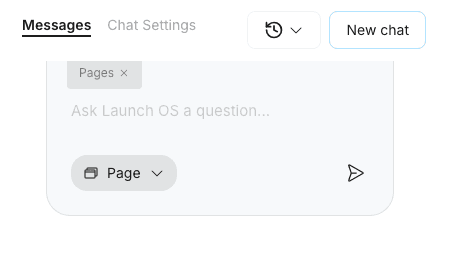
CoPilot knows which screen you came from. You see it as a small tag above the text box, like Pages. Click the × on the tag if you don't want CoPilot to use it.
Ask it to build a page
- Check that the button under the text box says Page. If it says something else, click it and choose Page Building. The other kinds of work are marked Upcoming.
- Describe the page in a sentence or two. Say who it's for and what you want visitors to do. For example: "A short landing page for a dog grooming shop that collects emails for a 10% off coupon."
- Press Enter, or click the arrow.
CoPilot answers with a plan for the page, called the Landing Page Blueprint: what the page is for, its length and its look. Read it over.
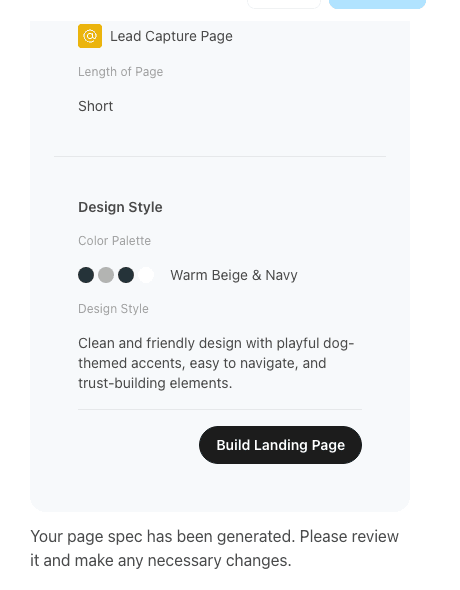
- Want changes? Click the pencil at the top of the plan, change what you like, such as the length or the colors.
- When the plan looks right, click Build Landing Page.
CoPilot builds the page one section at a time. You can watch it fill in. This takes a few minutes.
Save the page
When the page is built, click Save to Launch Pages at the top right.

Your page is saved as a draft in Launch Pages. Open it there to change words and pictures, then publish it when it's ready. See Edit your page and Publish your page.
Don't like it? Close the page with the × and nothing is saved.
Start over, or go back to a chat
- New chat at the top of the panel starts a fresh conversation.
- The clock button next to it lists your past chats. Click one to reopen it.
To close CoPilot, click the sparkle button again.
Good to know
- CoPilot only makes drafts. It never publishes a page, and it never changes a live page.
- It builds pages today. Building funnels, writing copy on its own, and answering questions about your account are on the way.
- Inside the page editor, you can also ask CoPilot to rewrite one part of a page. See Ask CoPilot to change a part.
Need help?
Email support@launchos.com.